


How Does Ergonomic Mouse Design Affect User Comfort and Productivity?
A computer mouse is one of the most frequently used accessories in modern workplaces. Whether someone is working in an office, studying at home, designing graphics, or managing business operations, the mouse plays an important role in everyday computer interaction.
However, a conventional mouse does not fit every hand or working style equally well. Differences in hand size, grip habits, body posture, and daily usage can influence how comfortable a mouse feels over time. This is why Ergonomic Mouse design has become an important consideration in computer peripheral development.
An Ergonomic Mouse is designed around the relationship between the user's hand, wrist, forearm, and the device itself. Its shape, height, button placement, and surface structure can all influence how users interact with it.
For manufacturers, understanding these design factors is essential when developing products for different markets and customer groups. For buyers, it provides a more practical way to evaluate mouse products beyond appearance and price.
1. What Is an Ergonomic Mouse?
An Ergonomic Mouse is a pointing device designed to support a more natural and comfortable hand position during computer use.
Traditional mice generally have a relatively flat, symmetrical or slightly curved shape. Users place their hands over the device, with the palm facing downward and the forearm rotated inward.
An Ergonomic Mouse may use a different body shape, a higher profile, a sloped surface, or a vertical orientation to change how the hand interacts with the device.
Common design features include:
Contoured surfaces that follow the shape of the hand
A raised or angled body to change wrist and forearm positioning
A thumb rest to provide additional support
Button placement that reduces unnecessary finger movement
Different sizes to accommodate different hand dimensions
Textured surfaces to improve grip and control
Not every ergonomic design uses the same approach. Some models retain the familiar shape of a conventional mouse but improve the contours, while others use a more distinctive vertical structure.
The goal of Ergonomic Mouse design is not simply to make a mouse look different. It is to create a device that works comfortably with the user's hand and the surrounding workstation.
2. How Mouse Shape Affects Hand and Wrist Position
Mouse shape is one of the most noticeable factors affecting user experience.
When using a conventional flat mouse, the palm generally faces downward. This position involves forearm pronation, meaning the forearm rotates so that the palm faces toward the desk.
An Ergonomic Mouse with a raised or angled body can change this position. Depending on its design, it may allow the hand to rest in a more angled or handshake-like orientation.
Traditional Horizontal Mouse
A traditional horizontal mouse is familiar to most users and usually requires little adjustment.
Its relatively low profile can make it suitable for users who prefer a flat hand position, especially when performing tasks that require frequent and precise cursor movements.
However, a poorly sized or shaped mouse may cause users to grip it tightly, bend their wrist, or extend their fingers unnecessarily.
Vertical Mouse
A vertical Ergonomic Mouse places the hand in a more upright position, often described as a handshake posture.
This design changes the angle of the hand and forearm compared with a conventional horizontal mouse. It may be worth considering for users who prefer a more upright grip.
For example, the Logitech MX Vertical uses a 57-degree angle, while the Kensington Pro Fit Ergo Vertical uses a 46.7-degree slope. These are examples of different commercial design approaches, not universal ergonomic standards. The appropriate angle depends on the user's hand, preferences, and working conditions.
Angled and Contoured Mouse
Some products use a shape between a conventional flat mouse and a fully vertical model.
An angled Ergonomic Mouse can provide a more gradual change in hand position while retaining a familiar operating style.
This approach may be suitable for users who want a different grip without making a major adjustment to their daily workflow.
3. Mouse Size and Hand Fit Matter
A mouse can have an advanced ergonomic shape and still feel uncomfortable if its dimensions do not match the user's hand.
Hand length, palm width, finger length, and thumb position all influence how a person holds and operates a mouse.
A mouse that is too small may require excessive finger curling or gripping. A mouse that is too large may force the user to stretch their fingers to reach the buttons.
For this reason, manufacturers should consider hand fit during product development.
Small, Medium, and Large Hand Sizes
Different users need different mouse dimensions.
A compact Ergonomic Mouse may be suitable for smaller hands or users who prefer fingertip control. Medium-sized designs can accommodate a broader range of users, while larger models may provide more palm support.
However, size categories alone are not enough. Two mice with similar external dimensions can feel very different because of their curves, height, thumb support, and button positions.
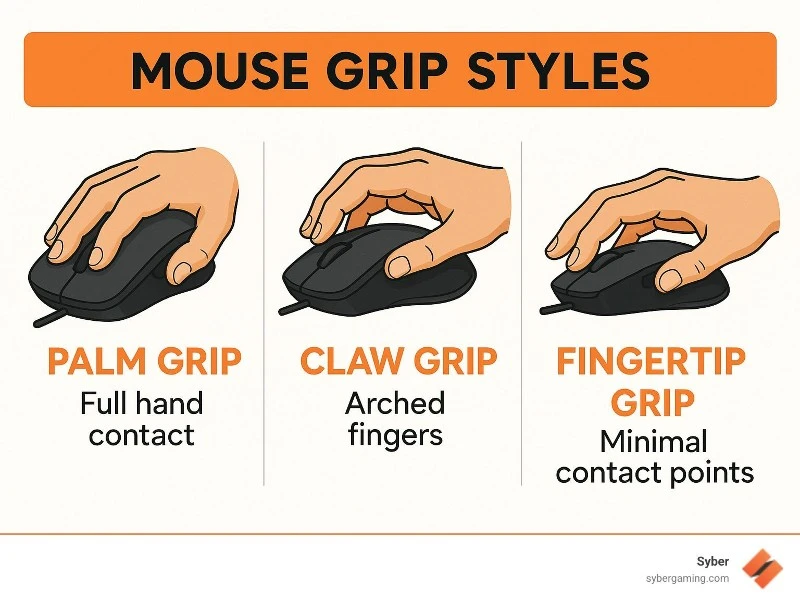
Palm, Claw, and Fingertip Grip
Grip style is another important consideration.
Palm grip: The palm rests on the mouse body, while the fingers extend toward the buttons. This style generally benefits from a mouse with sufficient length and palm support.
Claw grip: The palm makes partial contact with the rear of the mouse, while the fingers remain more arched. Users may prefer a shorter or more compact shape.
Fingertip grip: The mouse is controlled mainly through the fingertips, with little palm contact. A lighter and smaller design may be preferred by some users.
An Ergonomic Mouse should be evaluated according to its intended grip style rather than assuming one shape will work equally well for everyone.
4. Button Placement and Control Design
The shape of the mouse is only one part of its ergonomics. Button placement also affects how users interact with the device.
The primary buttons should be positioned so that users can operate them without excessive finger stretching or awkward hand movement.
Main Buttons
The left and right buttons are used repeatedly during normal computer operation. Their size, height, shape, and actuation characteristics can influence the clicking experience.
If the buttons are positioned too far forward or require excessive finger extension, some users may find the mouse less comfortable.
Side Buttons
Many modern mice include additional side buttons for functions such as forward, backward, or customized commands.
On an Ergonomic Mouse, these buttons should be positioned within a natural thumb reach. Poor placement may require users to change their grip every time they operate them.
Scroll Wheel
The scroll wheel should be easy to reach without requiring unnecessary finger movement.
Its diameter, surface texture, resistance, and scrolling behavior all contribute to the overall user experience.
For manufacturers, button layout should be evaluated together with the external shell design. A visually attractive mouse may still have usability problems if its controls are difficult to reach.
5. Materials and Surface Design
The materials used in an Ergonomic Mouse influence its weight, durability, grip, appearance, and manufacturing cost.
Most mouse housings use molded plastic materials. ABS is a common choice because it supports a range of shapes, surface finishes, and product designs.
Other design considerations include:
Surface texture: A smooth surface creates a different feel from a textured or matte finish. Texture may also influence how securely users hold the mouse.
Side grips: Some models use rubberized or textured side areas to improve grip, particularly around the thumb and fingers.
Weight distribution: The position of internal components, battery, and structural supports can affect how the mouse feels during movement.
Shell geometry: The height, curvature, and width of the housing influence how the hand rests on the device.
For an Ergonomic Mouse, material selection should support both the intended user experience and the product's manufacturing requirements. Surface treatments and material combinations should also be evaluated for consistency across production batches.
6. What Does Research Say About Ergonomic Mouse Design?
Mouse design should be informed by user testing and ergonomic research rather than appearance alone.
A 2015 study published in the journal Work compared flat, angled, and vertical computer mice. The researchers evaluated wrist posture, pointing performance, and user preferences.
The study involved 12 participants performing standardized point-and-click tasks.
Its findings included:
The tested concept mice reduced forearm pronation compared with a traditional flat mouse.
Pointing performance did not differ between the traditional flat mouse and the concept mice.
The fully vertical mouse reduced forearm pronation but had the poorest pointing performance among the tested designs.
One angled concept mouse received more favorable ratings for perceived fatigue and user preference.
The researchers concluded that increasing mouse height and angling the upper shell could improve wrist posture without necessarily reducing pointing performance.
This is useful evidence for product designers, but the study was small and evaluated specific mouse designs under controlled conditions. It does not establish that every vertical mouse is better than every traditional mouse.
The practical lesson is that Ergonomic Mouse development involves balancing posture, control, comfort, and user preference. A design should be evaluated as a complete product rather than judged by its angle or shape alone.
7. Examples of Ergonomic Mouse Designs on the Market
Looking at existing products can help manufacturers understand how different brands approach ergonomic design.
Several established peripheral brands offer products with different shapes and user positioning.
Logitech MX Vertical
The Logitech MX Vertical is a well-known example of a vertical Ergonomic Mouse.
Its 57-degree body angle and raised structure are designed around a handshake-style grip. The product demonstrates how a manufacturer can combine an upright form with familiar mouse controls.
Logitech Lift
The Logitech Lift uses a compact vertical design aimed at users who prefer a smaller mouse shape.
It illustrates the importance of size segmentation in the Ergonomic Mouse market. A vertical design does not have to use the same dimensions across all product categories.
Kensington Pro Fit Ergo Vertical
Kensington's Pro Fit Ergo Vertical Wireless Mouse uses a 46.7-degree slope and a contoured housing.
Its design includes an extended support area for the little finger, showing how manufacturers can use additional contact surfaces to influence hand support.
Razer Pro Click V2 Vertical Edition
Razer has also entered the vertical mouse category with its Pro Click V2 Vertical Edition.
This product demonstrates that ergonomic design is not limited to traditional office peripherals. Brands targeting productivity and gaming-related users can also explore vertical shapes and alternative grip positions.
These products are examples of different market approaches, not evidence that one design is universally superior. Their value for product development lies in understanding how shape, size, button layout, and intended user groups can be combined.
8. How to Choose an Ergonomic Mouse for Different Users
When selecting an Ergonomic Mouse, buyers should consider the user's hand size, grip style, daily tasks, and personal preferences.
For office users, comfort during extended computer work and easy access to frequently used buttons may be important.
For designers and other professionals who rely on precise cursor control, the shape should support comfortable movement without making pointing tasks difficult.
For users who prefer a more upright hand position, a vertical mouse may be worth testing. However, some users may need time to adapt to the different grip and movement pattern.
For users who travel frequently, a compact Ergonomic Mouse may offer a more practical balance between portability and hand support.
Before making a bulk purchasing decision, it is useful to test several product samples with people who represent the intended customer group. Feedback on grip, button reach, movement, and overall comfort can help identify design issues that are difficult to detect from product drawings alone.
9. Key Design Considerations for Ergonomic Mouse Manufacturers
For keyboard and mouse brands, developing an Ergonomic Mouse requires coordination between industrial design, mechanical engineering, electronics, and manufacturing.
Several areas deserve attention during product development.
Hand-size research: Define the target user group and collect hand-size information relevant to the intended market.
Housing design: Evaluate the overall height, width, length, curvature, and angle of the mouse body.
Button layout: Make sure primary and secondary controls are accessible without requiring awkward finger positions.
Material selection: Choose suitable housing plastics, surface finishes, and grip materials according to product requirements.
Internal component arrangement: Consider the position of the PCB, sensor, battery, scroll wheel, and switches when designing the external shape.
Prototype testing: Produce samples and evaluate them with representative users before finalizing the design.
Manufacturing consistency: Ensure that injection-molded shells, button structures, and assembled components maintain consistent dimensions and fit.
For an Ergonomic Mouse, even small changes in shell geometry can affect the way a product feels in the hand. This makes prototype evaluation and manufacturing precision particularly important.
Conclusion
Ergonomic Mouse design is about more than creating an unusual shape. It involves understanding how hand size, grip style, wrist position, button placement, materials, and product dimensions work together.
Research suggests that angled and vertical designs can change forearm posture, but user comfort and pointing performance depend on the specific design and individual preferences.
For consumers, choosing the right mouse means considering hand fit and intended use rather than relying on marketing claims. For brands and manufacturers, successful product development requires user research, careful structural design, prototype testing, and consistent manufacturing quality.
B&W Electronics Development Ltd. is a professional keyboard and mouse manufacturer offering OEM and ODM solutions, supported by in-house injection molding, SMT, and product assembly capabilities to serve global customers.


